TACTICAL GUIDE / Update 2 / October 26 footage
Abilities
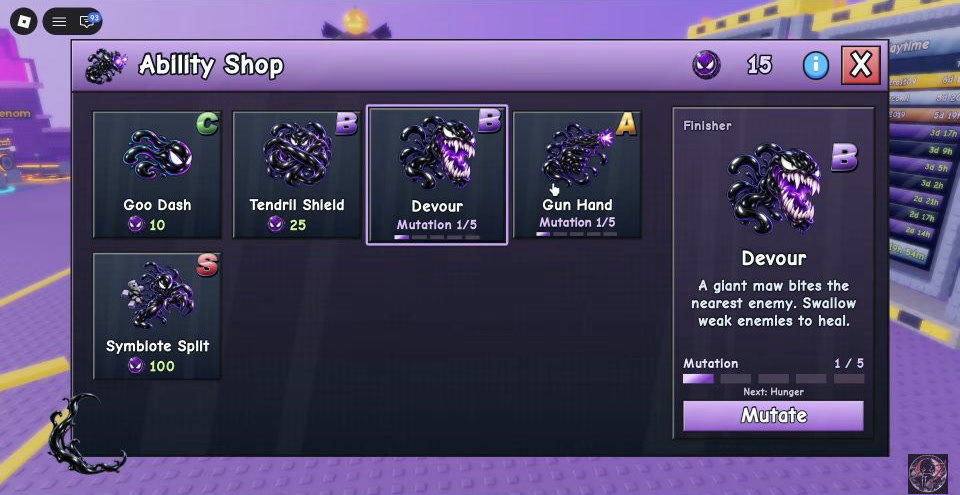
Open Ability Shop, use stage tokens to buy or upgrade, then equip in Backpack → Abilities. Devour heals by swallowing weak enemies. If none are available, do not rely on Devour for this run’s healing; Symbiote Split is another healing choice named in the source.
Updated 2026-11-07 · Update 2 / October 26 footage
 Open full-size image ↗
Your route
Open Ability Shop and identify your problem
Use the Abilities button in the left-side menu. The shop frame shows Goo Dash, Tendril Shield, Devour, Gun Hand and Symbiote Split. Decide whether the failed run needs healing, damage or another utility before choosing; a letter grade in this old shop frame is not proof of a current tier list.
Get stage tokens, then buy or upgrade
Shin explains that tokens come from running stages and are used to purchase abilities and mutate or upgrade them. Select the ability in Ability Shop and read the current action, token requirement and effect before spending. The selected Devour frame shows a Mutate control and its current mutation progress; it does not establish all present-day costs.
A practical default when you need healing
Choose Devour for healing when weak enemies are available to swallow. Its visible description says the giant maw bites the nearest enemy and swallowing weak enemies heals you. If there are no weak enemies, do not rely on Devour for this run’s healing. Shin uses Devour with Gun Hand for healing and damage, and names Symbiote Split as another healing choice. Gun Hand is a damage option when range is useful; choose from the current in-game descriptions.
Open full-size image ↗Devour’s selected description says “Swallow weak enemies to heal.” Shin · 2:11.3, October 26. Open the original for the full shop. Equip the purchase in Backpack → Abilities
Open Backpack and choose its Abilities tab to equip an ability you have purchased. Buying it in the shop is not the same as equipping it. Before entering a ticketed Tower run, confirm that your intended ability is in the equipped slot and follow the actual control shown by your HUD. No mobile or controller binding is established here.
Use the ability during the right window
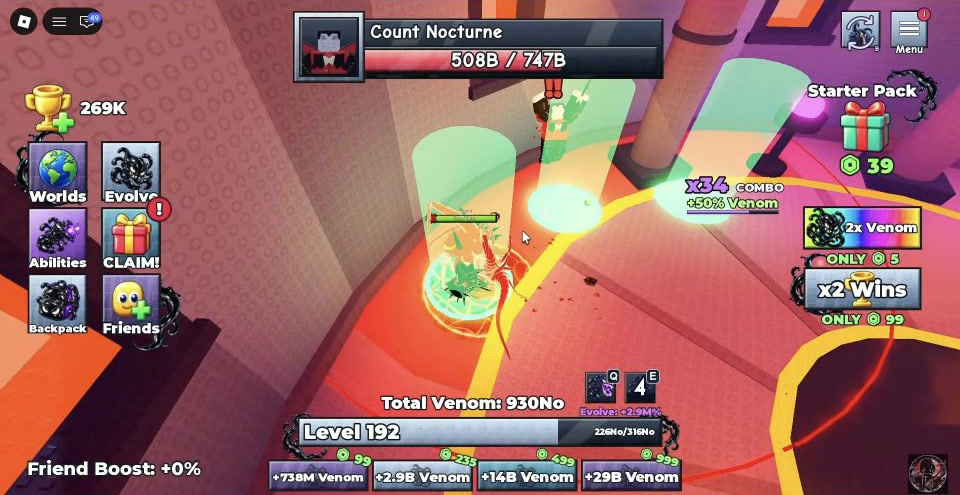
In the October 31 PC footage, the two equipped ability slots at bottom center are labeled Q and E. Press the key corresponding to your equipped icon; if your current HUD differs, use its displayed control. Mobile and controller bindings are not established here. In a Tower fight, create room to use your equipped healing ability while dodging, then return to damage after the boss’s active move ends. Devour still needs weak enemies to swallow; waiting out of combat alone does not satisfy that condition.
Watch a healing gap in the Reaper fight ↗
 Open full-size image ↗
In this October 31 PC footage, the two bottom-center ability slots are labeled Q and E. Use the key matching your equipped icon. Shin · 2:08.
What success looks like
The ability is purchased, appears equipped in Backpack → Abilities, and its action is available through your current game HUD. Check the observed effect during a suitable encounter rather than treating a shop purchase as completion.
If you get stuck
If you cannot buy or upgrade, compare your token balance with the current shop action. If the purchase cannot be used, check Backpack → Abilities and equip it. If the problem is survival after equipping, follow the boss’s dodge pattern and use healing in a gap rather than standing in danger to cast.
Prepare your next attempt
Sources & footage
- Shin — Update 2 abilities, October 26, 2026 ↗
Tokens, purchase, mutation/upgrade, Devour and Gun Hand usage, and healing choices.
- 2:11 — visible Ability Shop and Devour description ↗
- 2:45 — Backpack Abilities equip step ↗
- Shin — visible PC Q/E ability slots, October 31, 2026, 2:08 ↗
The recorded HUD labels two bottom-center slots Q and E. The changing slot number is not used as a fixed cooldown or cost.
Screenshots show the recorded version. Game updates can change prompts, event access and values. This is an independent guide, not an official Roblox or developer site.