TACTICAL GUIDE / Update 2 / October 26 footage
Backpack
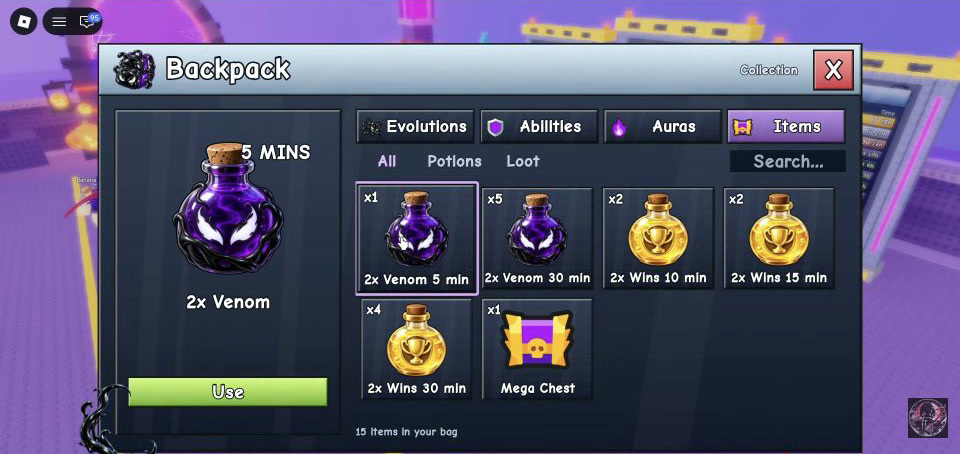
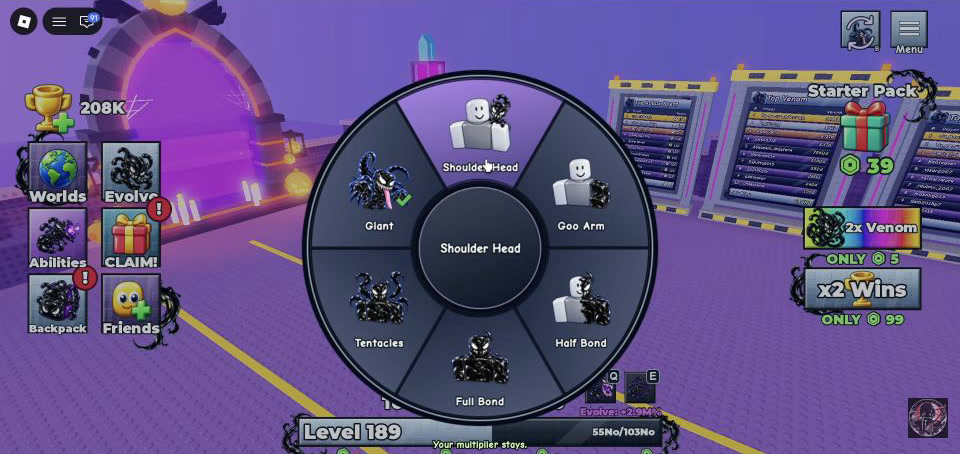
Backpack has four tabs: Evolutions, Abilities, Auras and Items. Use Abilities to equip a purchased skill and Items to select stored potions, then press Use. For the separate body-shape Forms wheel, press B on PC or use the top-right icon; it is not the old-evolution appearance list.
Updated 2026-11-07 · Update 2 / October 26 footage
 Open full-size image ↗
Your route
Open Backpack and choose the job
Use Backpack in the left-side menu. In the recorded UI, Evolutions, Abilities, Auras and Items are the four top tabs. Pick the tab for the action you want instead of searching through one shared list.
Evolutions: display an older evolution style
The Update 2 demonstration explains that Backpack can use different evolution styles while keeping your current Venom power. Use the Evolutions tab for an owned evolution’s look. This appearance selection is separate from pressing Evolve to gain an income multiplier and reset progression.
Abilities: equip what you already bought
Use Backpack → Abilities to equip a purchase from Ability Shop. If a purchased skill is missing from your usable set, check here before spending more tokens. The full buy-and-upgrade route is in the Abilities guide below.
Auras: find purchased auras
Purchased auras are stored in the Auras tab. The source creator explicitly does not know whether different auras can be used together; this page therefore does not promise stacking or a combined bonus.
Items: store first, Use when needed
Open Items, then use All, Potions or Loot to narrow the list. Select the potion you want and read its type and duration in the item panel before pressing Use. The screenshot shows a selected 2x Venom potion and a green Use button at lower left. Potions can be stored instead of being consumed immediately, so collecting one is not the same as activating it.
Open full-size image ↗Select the potion, check its name, then press Use. This frame selects 2x Venom. Shin · 3:00, October 26. Forms wheel: B or the top-right icon
For the separate Forms selector, press B on PC or select the icon beside the top-right menu. The six visible body-style choices are Giant, Shoulder Head, Goo Arm, Half Bond, Full Bond and Tentacles. A green check marks the current choice in the frame, and the footer says “Your multiplier stays.” This wheel is distinct from the Backpack Evolutions tab.
 Open full-size image ↗
The Forms wheel is separate from Backpack → Evolutions. The source HUD says “Your multiplier stays.” Shin · 1:20, October 26.
What success looks like
You are in the correct interface: an owned evolution look in Evolutions, an equipped skill in Abilities, stored auras in Auras, a deliberately selected and used item in Items, or a checked body-style choice on the Forms wheel.
If you get stuck
If the item you want is not visible, check the tab and then the Items filter. If you expected a potion effect just from receiving it, select it in Items and use it deliberately. If B opens the body wheel when you wanted an old evolution appearance, close the wheel and use Backpack → Evolutions instead.
Prepare your next attempt
Sources & footage
- Shin — Forms, October 26, 2026, 1:16 onward ↗
B/top-right entry and the separate body-style selector.
- 2:24 — evolution appearance while keeping current Venom ↗
- 2:45 — Abilities / Auras / Items ↗
- 3:00 — stored potions and visible Use control ↗
Screenshots show the recorded version. Game updates can change prompts, event access and values. This is an independent guide, not an official Roblox or developer site.